Skip to content
www.mytechnote.ru
Menu
  • Administration
    • Scripts
  • Equipment
    • Reviews
    • Instructions
  • Other
  • English
    • English
    • Русский
Menu

How to Fix a Faulty Back Button on Fly IQ434: A Simple Guide

Struggling with a malfunctioning back button on your Fly IQ434 smartphone? You’re not alone. Many Android users face similar hardware issues, and instead of investing in costly repairs or new devices, there’s a DIY software solution you might want to consider. This guide will walk you through the process.

Prerequisites: This method requires a rooted Android device.

  1. Install a Root-Compatible File Manager:

    • Download ES File Explorer from the Play Market, a popular choice among Android users.

How to Fix a Faulty Back Button on Fly IQ434: A Simple Guide - es file explorer

  1. Enable Root Permissions:

    • Launch the app, activate the ‘root explorer’ feature, and provide the necessary permissions.
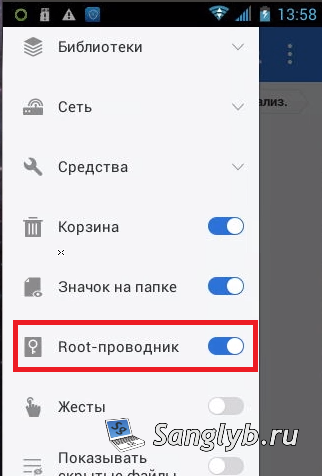
How to Fix a Faulty Back Button on Fly IQ434: A Simple Guide - take root access for file manager

  1. Navigate to Keylayout Directory:

    • Head to the /system/usr/keylayout directory.
    • Always backup this folder first.
  2. Modify Keylayout Configuration:

    • Open the .kl file suitable for your device (commonly Geneic.kl).
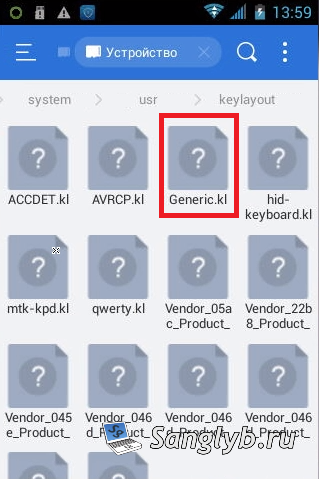
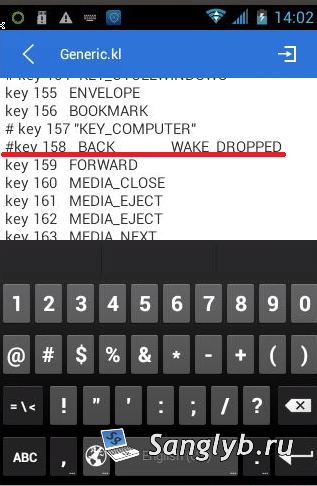
    • Comment out the line BACK WAKE_DROPPED using a ‘#’.

How to Fix a Faulty Back Button on Fly IQ434: A Simple Guide - find file Generic.kl

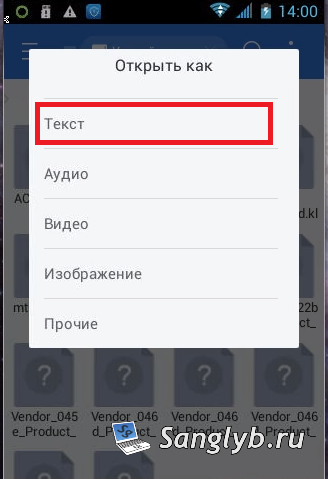
How to Fix a Faulty Back Button on Fly IQ434: A Simple Guide - edit file as text

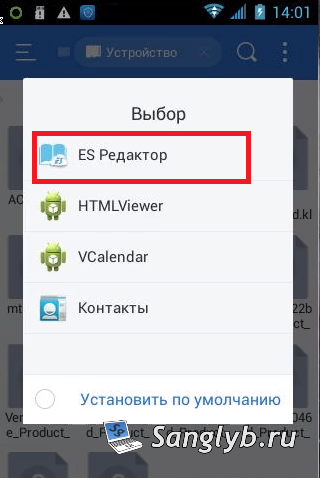
How to Fix a Faulty Back Button on Fly IQ434: A Simple Guide - edit file with es editor

How to Fix a Faulty Back Button on Fly IQ434: A Simple Guide - comment required line in file

  1. Reboot and Test:

    • Restart your phone. If the back button still operates, you might need to adjust another .kl file.
  2. Introduce a Software Button:

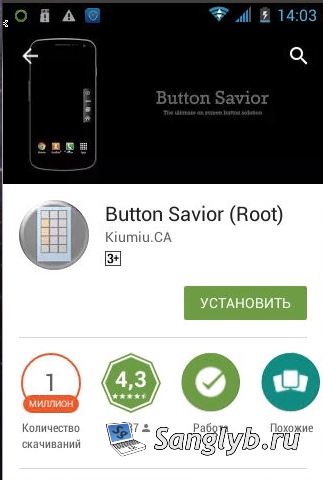
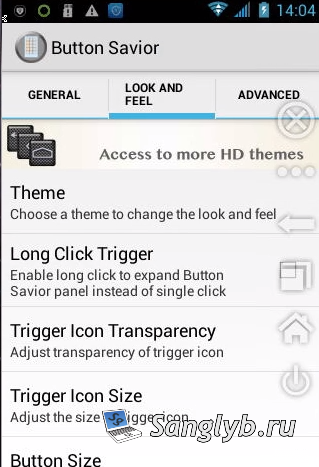
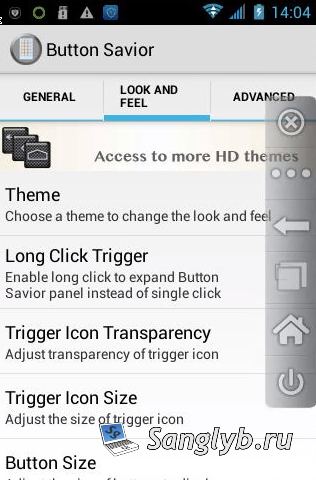
    • Download Button Savior from the Play Market. It’s a favorite Android button emulator.
    • For enhanced button visibility, pick the ‘Froyo’ theme and activate ‘Hide On Outside Touch’.

How to Fix a Faulty Back Button on Fly IQ434: A Simple Guide - button savior in play market

How to Fix a Faulty Back Button on Fly IQ434: A Simple Guide - button savior in play market - default theme

How to Fix a Faulty Back Button on Fly IQ434: A Simple Guide - button savior changed theme

How to Fix a Faulty Back Button on Fly IQ434: A Simple Guide - button savior advanced settings

Disclaimer: DIY methods involve risks. Always proceed cautiously and understand the implications for your device.

Related Video: For those who prefer visual instructions, check out our comprehensive video guide.

Posted on 04.09.202330.05.2024 by sanglyb

Post navigation

← Resolving SSL Certificate Issues on ISPManager 4
Transform Android into a Surveillance Camera with ZoneMinder on Ubuntu Server 16.04 →

Leave a Reply Cancel reply

Your email address will not be published. Required fields are marked *

Подписывайтесь

Youtube
vk
telegram
github
twitter
rss
  • Форум
  • Об авторе
  • Поддержать автора

Популярные записи

Новые записи

  • How to Extend an LVM Partition in Linux
  • SCCM Reporting Errors After Migrating from SQL Server 2016 to 2019
  • Problem Using PassFiltEx on Older CPUs
  • How to remove attachments from old calendar events in Exchange using a script
  • How to download and install Office 2024 LTSC

Архивы

  • 2026 (3)
  • 2025 (5)
  • 2024 (7)
  • 2023 (30)
  • 2022 (4)
  • 2020 (17)
  • 2017 (82)
  • 2016 (5)
© 2015-2026 www.mytechnote.ru
Использование материалов сайта возможно только с разрешения владельца или обязательна индексируемая, прямая, передающая вес ссылка на материал.