Looking for a smart way to repurpose your old Android device? Turn it into a state-of-the-art surveillance camera using ZoneMinder on Ubuntu Server 16.04. This step-by-step guide will unveil the secrets of this setup.
For those who just looking for commands:
sudo apt-get update
sudo apt-get upgrade
sudo tasksel install lamp-server
cat /etc/timezone
sudo dpkg-reconfigure tzdata
nano /etc/php/7.0/apache2/php.ini
date.timezone = Europe/Moscow
sudo apt-get install zoneminder
sudo mysql -uroot -p < /usr/share/zoneminder/db/zm_create.sql
mysql -uroot -p -e "grant select,insert,update,delete,create,\
alter,index,lock tables on zm.* to 'zmuser'@localhost identified by 'zmpass';"
sudo a2enconf zoneminder
sudo a2enmod rewrite
sudo a2enmod cgi
sudo chown www-data:www-data /etc/zm/zm.conf
sudo su
echo "kernel.shmall = 134217728" >> /etc/sysctl.conf
echo "kernel.shmmax = 134217728" >> /etc/sysctl.conf
echo 134217728 >/proc/sys/kernel/shmall
echo 134217728 >/proc/sys/kernel/shmmax
systemctl enable zoneminder
echo "sql_mode = NO_ENGINE_SUBSTITUTION" >> /etc/mysql/mysql.conf.d/mysqld.cnf
reboot
Also there is a video:
1. Preparing Your Ubuntu System for ZoneMinder
1. Start with the basics:
sudo apt-get update
sudo apt-get upgrade
sudo tasksel install lamp-server
2. Synchronize Timezone on Your Ubuntu Server
Ensure a unified timezone between server and PHP:
cat /etc/timezoneIf it’s differs from yours:
sudo dpkg-reconfigure tzdataSet correct timezone for php:
nano /etc/php/7.0/apache2/php.iniChange line containing date.timezone
[Date]
; Defines the default timezone used by the date functions
; http://php.net/date.timezone
date.timezone = Europe/Moscow
2. Seamless ZoneMinder Installation & Configuration
a. Kick-off the Installation:
sudo apt-get install zoneminderb. Database Harmony:
Merge ZoneMinder with MySQL database:
sudo mysql -uroot -p < /usr/share/zoneminder/db/zm_create.sql
mysql -uroot -p -e "grant select,insert,update,delete,create,\
alter,index,lock tables on zm.* to 'zmuser'@localhost identified by 'zmpass';"
For custom passwords, modify the /etc/zm/zm.conf.
c. Apache Configuration:
sudo a2enconf zoneminder
sudo a2enmod rewrite
sudo a2enmod cgi
sudo chown www-data:www-data /etc/zm/zm.conf
d. Maximizing Memory for ZoneMinder:
sudo echo "kernel.shmall = 134217728" >> /etc/sysctl.conf
sudo echo "kernel.shmmax = 134217728" >> /etc/sysctl.conf
sudo echo 134217728 >/proc/sys/kernel/shmall
sudo echo 134217728 >/proc/sys/kernel/shmmax
e. Activate ZoneMinder Automatically:
systemctl enable zoneminderf. Avoid MySql Errors:
Add sql_mode = NO_ENGINE_SUBSTITUTION to /etc/mysql/mysql.conf.d/mysqld.cnf, or you may see an error during adding a camera to your Zoneminder like this:
SQL-ERR ‘SQLSTATE[HY000]: General error: 1366 Incorrect integer value: ” for column ‘ServerId’ at row 1′, statement was ‘insert into Monitors set LinkedMonitors = ”, Name = ‘fly’, ServerId = ”, Type = ‘Remote’, Function = ‘Modect’, Enabled = ‘1’, RefBlendPerc = ‘6’, AlarmRefBlendPerc = ‘6’, AnalysisFPS = ”, MaxFPS = ”, AlarmMaxFPS = ”, Device = ‘/dev/video0’, Channel = ‘0’, Format = ‘255’, Palette = ‘0’, V4LMultiBuffer = ”, V4LCapturesPerFrame = ‘1’, Protocol = ‘http’, Host = ‘192.168.1.132’, Port = ‘8080’, Method = ‘simple’, Options = ”, Path = ‘/video’, User = ”, Pass = ”, Colours = ‘3’, Width = ‘1280’, Height = ‘720’, Orientation = ‘0’, Deinterlacing = ‘0’, RTSPDescribe = ”, LabelFormat = ‘%N – %Y-%m-%d %H:%M:%S %z’, LabelX = ‘0’, LabelY = ‘0’, LabelSize = ‘1’, ImageBufferCount = ’50’, WarmupCount = ’25’, PreEventCount = ’25’, PostEventCount = ’25’, StreamReplayBuffer = ‘1000’, AlarmFrameCount = ‘1’, SignalCheckColour = ‘#0000c0’, EventPrefix = ‘Home-‘, SectionLength = ‘600’, FrameSkip = ‘0’, MotionFrameSkip = ‘0’, AnalysisUpdateDelay = ‘0’, FPSReportInterval = ‘1000’, DefaultView = ‘Events’, DefaultRate = ‘100’, DefaultScale = ‘100’, WebColour = ‘red’, Sequence = 1′
You can make changes with:
echo "sql_mode = NO_ENGINE_SUBSTITUTION" >> /etc/mysql/mysql.conf.d/mysqld.cnfg. Reboot:
reboot3. Make initial configuration of ZoneMinder:
- Navigate to http://your-ip/zm. Go to options.

- Go to users tab, and select admin
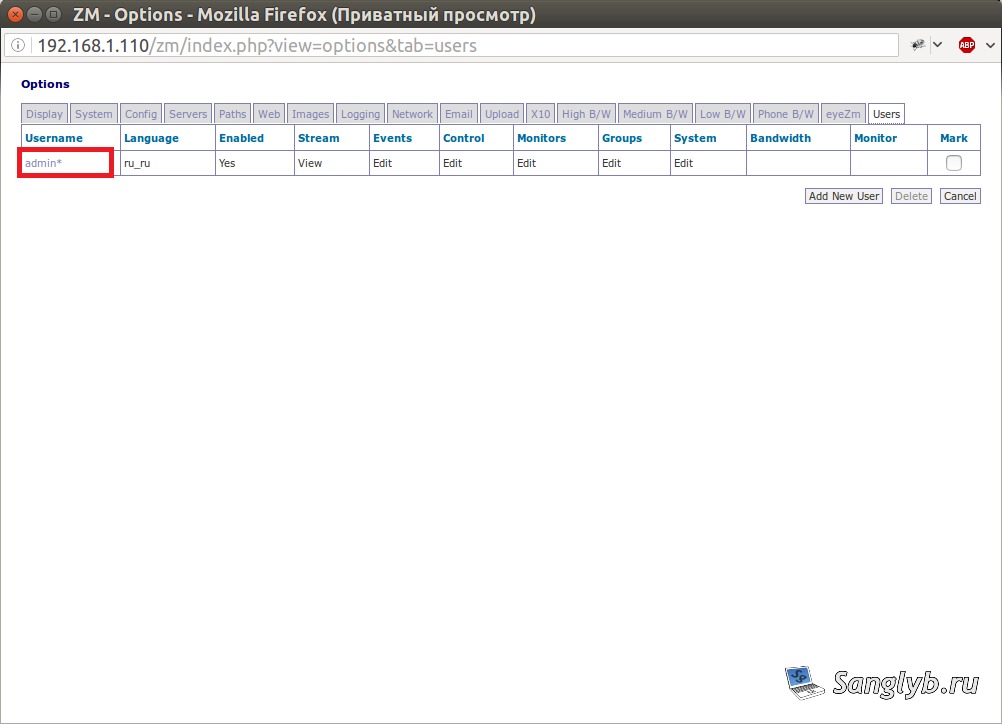
- Secure your surveillance with an admin password.
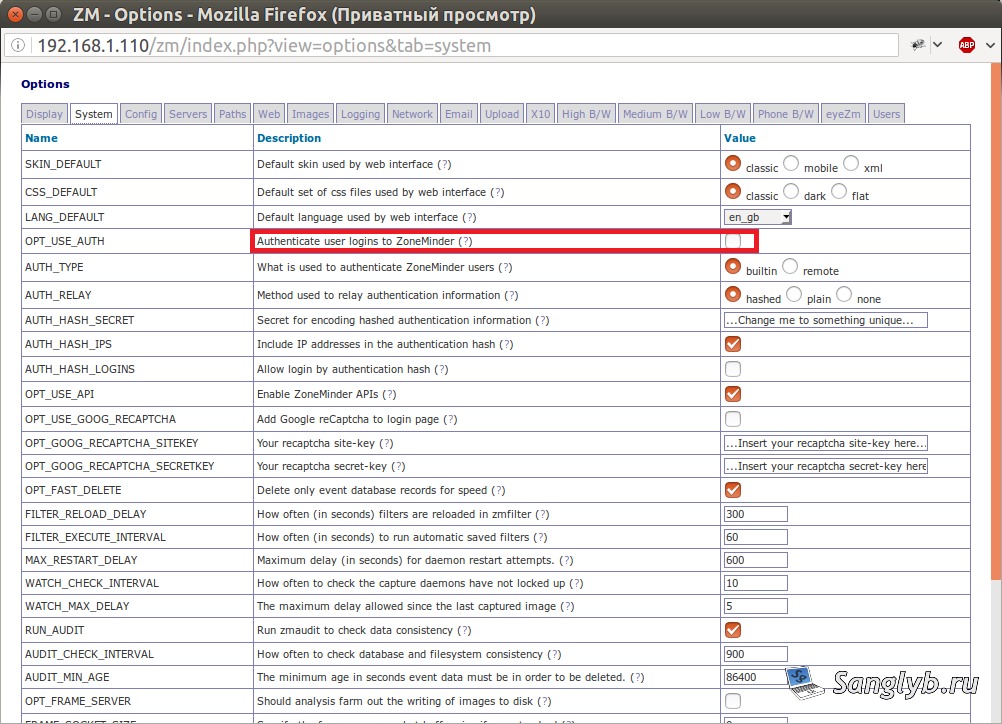
- Activate Authenticate user logins to ZoneMinder at system tab to keep intruders out.
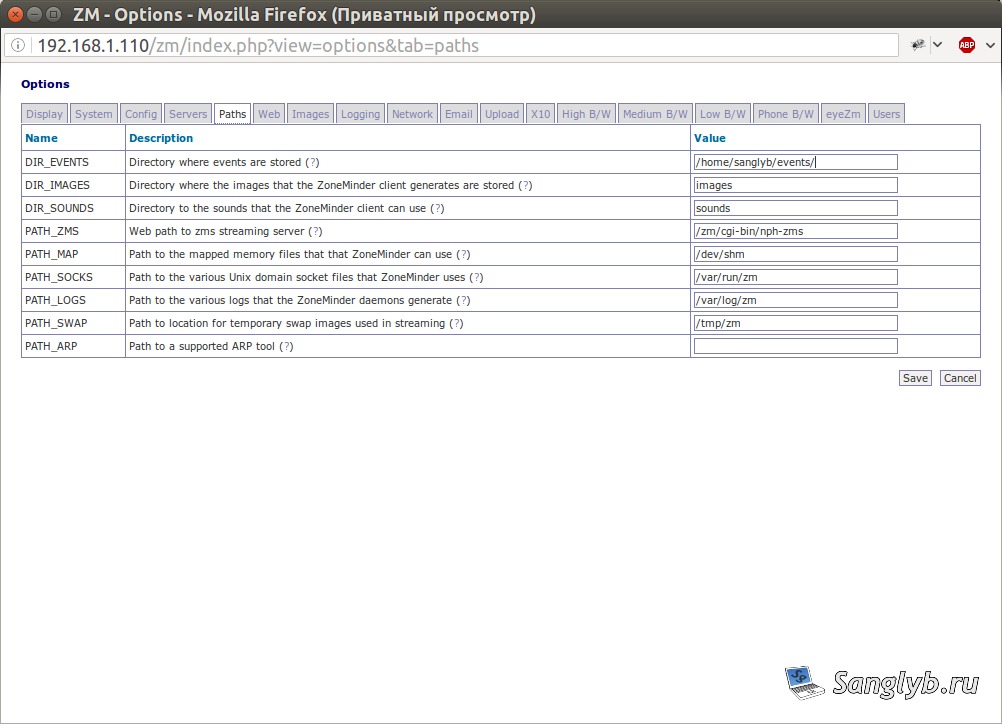
- For dedicated recording storage, tailor the paths as required.
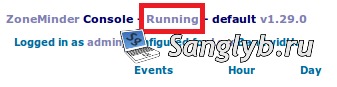
Don’t forget to refresh ZoneMinder:
(Console — Running):
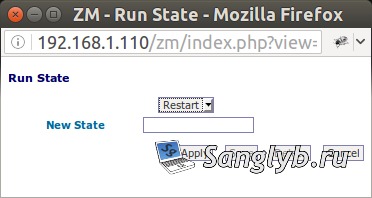
Or:
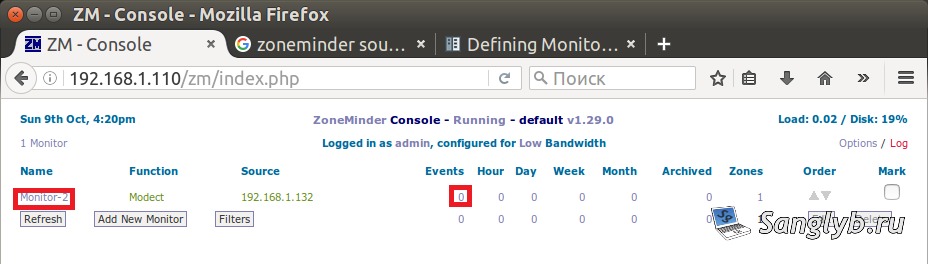
sudo /etc/init.d/zoneminder restart4. Integrating Your Android Device (or other camera):
- Prepare your phone.
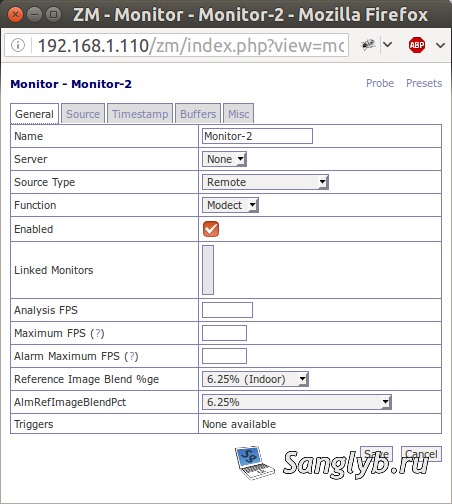
- Select Add New Monitor.

- Fine-tune with Source Type — Remote and Function — Modect. (Monitor – just view, without record; modect – motion detected record; mocord – permanent record, with showcasing of motion detection; nodect – turn off built in motion detection)
- Sync your Android by setting Remote Protocol — HTTP, IP, port to 8080, and path to /video.
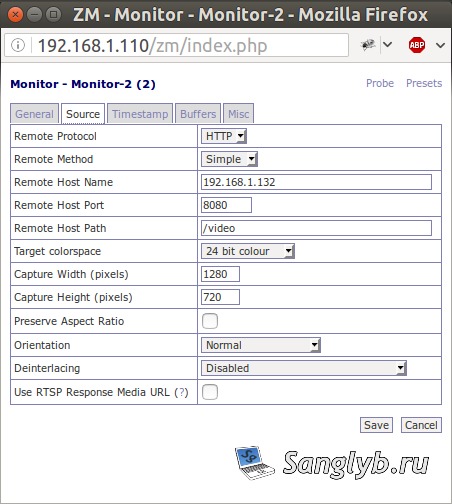
Post-setup, a green source indicates successful configuration. Modify zones for precision in motion detection.
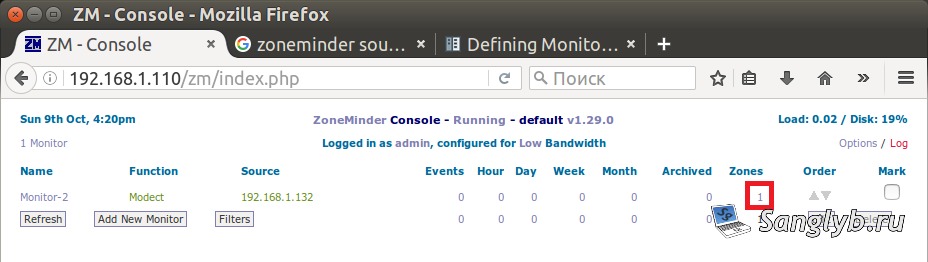
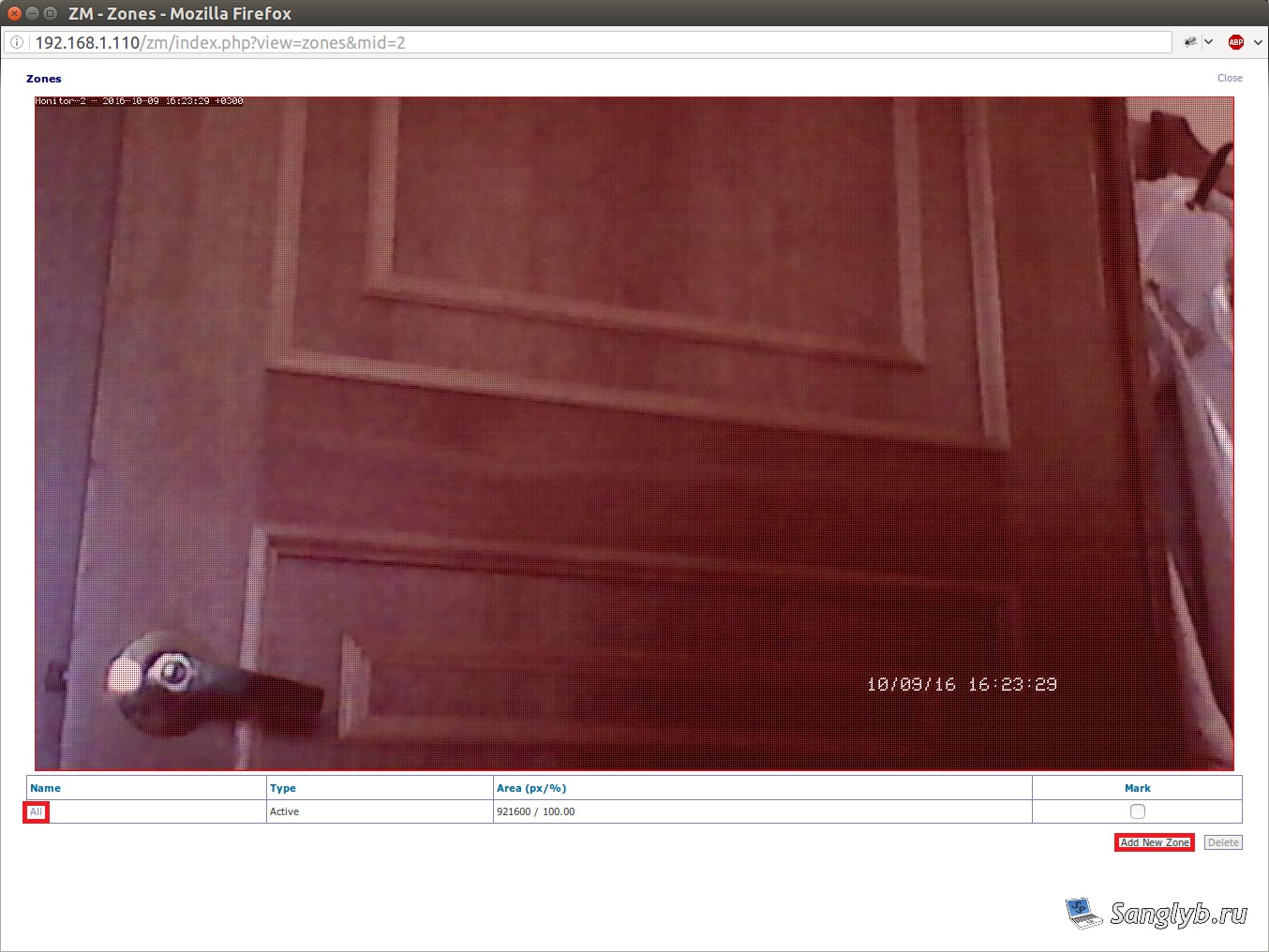
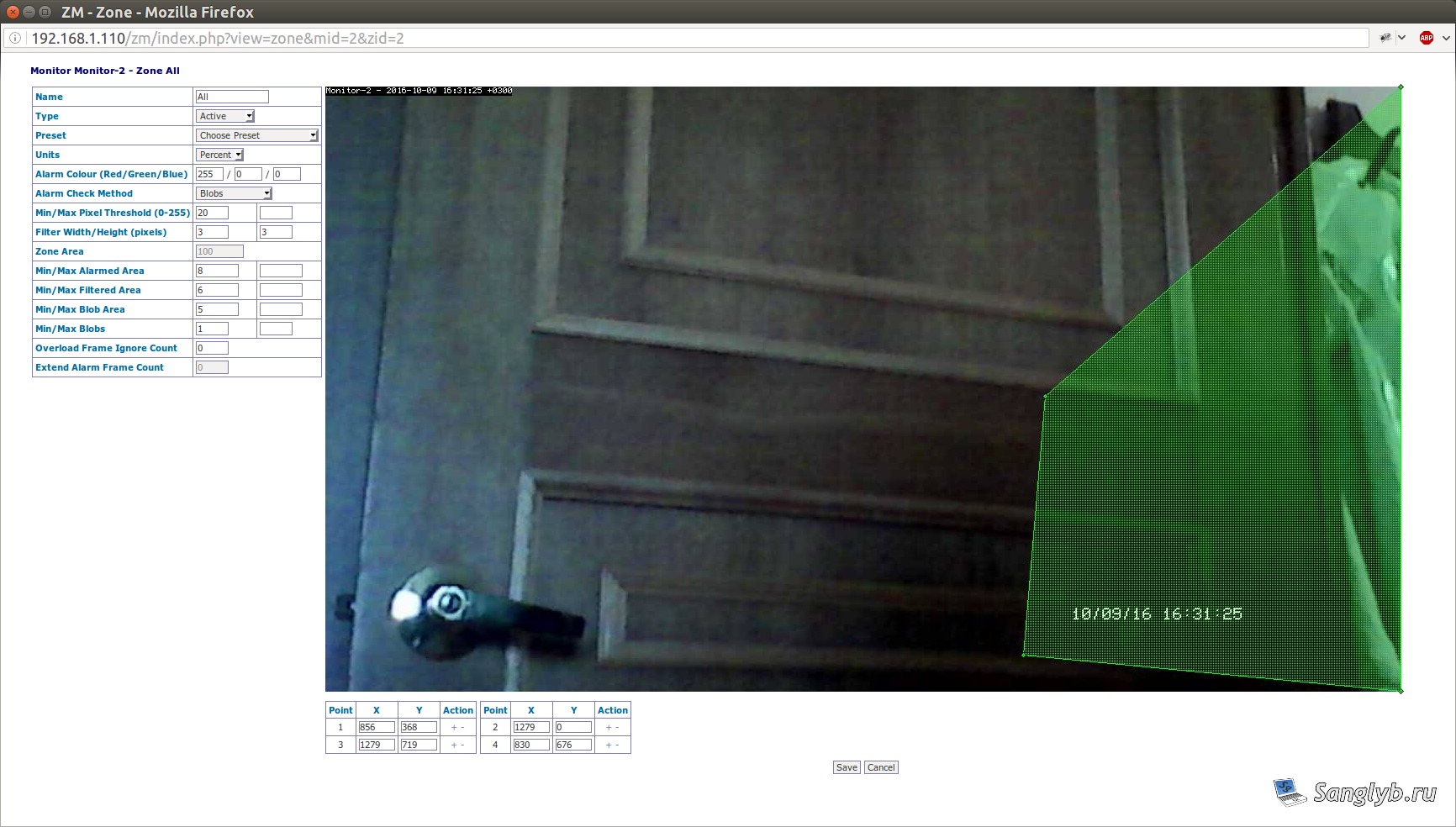
With these tweaks, motion will trigger video captures. Access live feeds or past events effortlessly.