
Are you juggling multiple video projects and wondering how to streamline the intro-insertion process? Discover our automated solution for embedding intros across a bulk of videos.
Why Automated Intro Insertion is a Game-Changer
Manually inserting intros works fine when you’re handling 2-3 videos. But what if you’re dealing with 100 or more? Time to ditch the manual process and embrace automation.
Seamlessly Add Intros to Your Videos: Here’s Our Revolutionary Video Automation Script
Skip the tedium and hassle with our specially-designed script for automated video intro insertion. Make your workflow more efficient than ever before.
Don’t Feel Like Reading? Watch Our Step-by-Step Video Tutorial
For the visual learners among you, we’ve crafted a detailed video tutorial to guide you through the process:
Quick Start: Your Complete Toolset for Automated Intro Insertion
- Download the Script Archive Here
- Unzip to Reveal:
<strong>intro</strong>folder: Designated for your introductory clips.<strong>videos</strong>folder: Queue your primary video files here.<strong>with_intro</strong>folder: Where the magic happens—your intro-embedded videos will populate this folder.<strong>concat-videos.bat</strong>: The core script to execute the automation.<strong>ffmpeg.exe</strong>: A crucial 64-bit component for the operation. If your system runs on 32-bit, download the compatible version from ffmpeg.org.
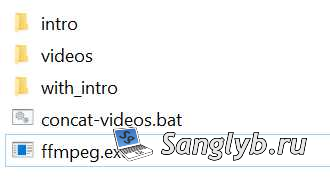
Your Simple 3-Step Process for Batch Video Intro Insertion
- Transfer Intro and Videos: Place them in their respective folders.
- Run the Script: Execute
concat-videos.bat. - Collect Your Edited Videos: Find them in the
with_introfolder, each furnished with your chosen intro.
Important Note: Consistency is key. All videos and intros must be of the same format and employ identical codec settings.
For the Tech-Savvy: Dive into the Script Code
For those keen to know the technical specifics, here’s a glimpse of the script code:
::We rename the intro file so that there are no spaces in the name.
cd intro
Setlocal enabledelayedexpansion
Set "Pattern= "
Set "Replace=_"
For %%a in (* ) Do (
    Set "File=%%~a"
    Ren "%%a" "!File:%Pattern%=%Replace%!"
)
For %%a in (* ) Do (
    Set "intro=%%a"
)
cd ..
::We rename the video files so that there are no spaces in the name.
cd videos
Setlocal enabledelayedexpansion
Set "Pattern= "
Set "Replace=_"
For %%a in (* ) Do (
    Set "File=%%~a"
    Ren "%%a" "!File:%Pattern%=%Replace%!"
)
::We combine the intro and the video.
for %%k in (* ) do (
cd ..
ffmpeg.exe -i "concat:intro/%intro%|videos/%%k" -c copy with_intro/with_tintro_%%k
cd videos
)
exit