
Experiencing security warnings on Android when using SSL on ISPManager 4? You’re not alone. We recently addressed a similar concern for one of our clients, and here’s a step-by-step guide on how to set it right.
Background: The Android SSL Challenge with ISPManager 4
A valued client, who relies on our VPS hosting services integrated with ISPManager 4, reported an unsettling issue: an SSL security warning on Android devices when accessing their website via HTTPS. This warning indicated the certificate originated from an untrusted entity. Interestingly, this warning was absent when accessing the website from a desktop.
Our deep-dive into the matter revealed an incorrect installation of the SSL certificate, with a specific hiccup in the certificate chain setup.
Comodo SSL Certificates: A Brief Overview
The client’s choice for their SSL solution was Comodo, a renowned certificate provider. Comodo’s package included a private key and four critical certificate files:
- The primary certificate
- Three chain certificates, namely:
COMODORSADomainValidationSecureServerCA.crtCOMODORSAAddTrustCA.crtAddTrustExternalCARoot.crt
Installing SSL Certificates on ISPManager 4: A Detailed Walkthrough
- Enabling SSL Access:
- Log into the dashboard as an administrator.
- Proceed to ‘Users’ and activate SSL by marking the checkbox.
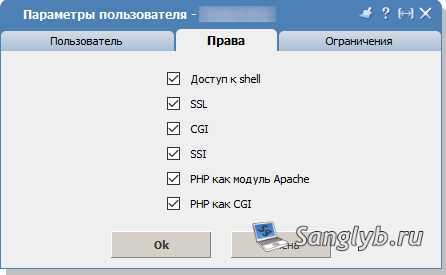
- Certificate Details Configuration:
- Switch to user mode (or simply tap the top-right login icon).
- Opt for ‘SSL Certificates’ > ‘Create’.
- Select ‘Existing’ under certificate type and label it appropriately.
- Input the provided details in the ‘Private Key’ box.
- Utilizing a text editor like Notepad, open the primary certificate file (commonly
domain.com.crt), copy its contents, and paste them into the ‘Certificate’ field. - Repeat the above step for the chain certificate files, ensuring the order matches our list above.
- Prior to saving, scour for and eliminate any unwanted line breaks.
- Confirm with ‘OK’. Your fresh certificate should now be visible on the list.
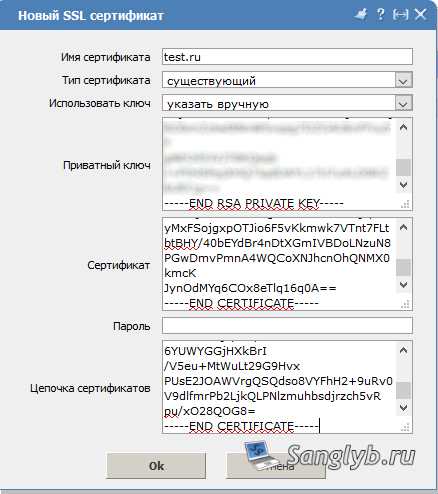
- Linking the SSL Certificate to Your Domains:
- Venture into ‘WWW Domains’ and select the pertinent website.
- Activate SSL and from the dropdown, appoint the new certificate.
- Validate changes with ‘OK’.
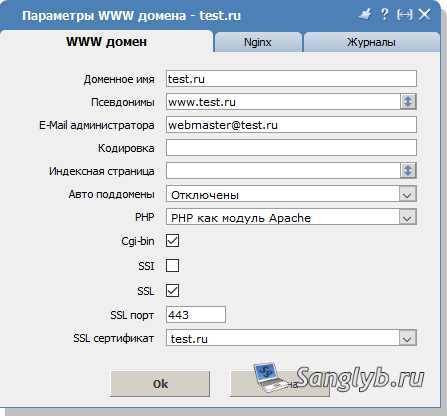
Correctly following the outlined procedure guarantees a warning-free user experience while accessing your site via HTTPS on Android devices.
Want a Free SSL Solution?
Not everyone wishes to invest in premium certificates. If you’re looking to save, discover how to secure a cost-free certificate through our Let’s Encrypt Guide.
Watch & Learn: SSL Configuration on ISPManager 4
For those who prefer visual instructions, here’s our comprehensive video tutorial: