
Have you ever wanted to watch Star Wars in a way you’ve never experienced before? We’ve got a fantastic hack for you! In this post, we’ll show you how to watch Star Wars right from your Linux terminal or Windows command line. It’s a fun and quirky way to enjoy the epic saga like never before. Let’s dive in!
Update (UPD): Unfortunately, the link mentioned in the original article is no longer functional. But don’t worry; we’ve got an alternative for you. You can still enjoy the same Star Wars experience directly from your browser by visiting this link.
Update 1 (UPD1): If you want to take your Star Wars adventure further, you can connect via telnet to the address telehack.com and simply type “starwars” in your terminal. Additionally, Telehack offers a treasure trove of fascinating content beyond Star Wars.
Installation Guide:
- For Windows Users:
- Open the control panel.
- Navigate to “All Programs.”
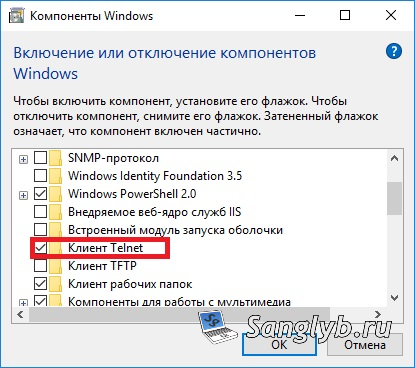
- Select “Turn Windows Features On or Off.”
- Check the box next to “Telnet Client” and click “OK.”
- For Linux Users:
- You may not need any additional installation, as many Linux distributions come with telnet pre-installed. However, if it’s not installed on your system, you can use your package manager to install it.
Once you’ve completed the installation (if required), open your command prompt and enter the following command:
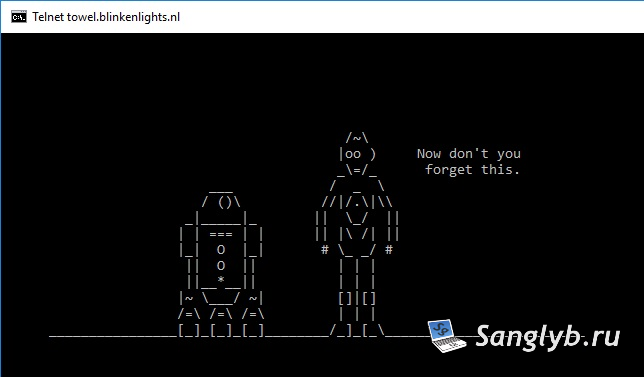
telnet towel.blinkenlights.nl
Now, patiently wait for the magic to happen as Star Wars unfolds in your terminal window.
That’s it! You’re all set to enjoy the Star Wars universe in a whole new light. May the Force be with you as you embark on this unique cinematic journey.