
When managing a local network, you may face challenges directing clients to the correct domain or resource. Whether it’s ensuring local clients get a local address or external clients receive an external one, DNS configuration can be complex. Throw in multiple subnets and the challenge grows. Thankfully, a solution exists with Bind9’s ACL lists. Let’s dive into how this can be configured.
Setting Up Bind9 on Ubuntu Server 16.04
-
Initial Setup:
- Start with a fresh Ubuntu Server 16.04 installation.
- Activate superuser mode and update the system:
sudo su
apt update
apt upgrade-
Install Bind9:
apt install bind9-
Organizing Configuration Files:
-
Create directories for both internal and external clients.
mkdir /etc/bind/internals mkdir /etc/bind/externalsCreating Zone Configurations
For internal clients:
- Edit zone configurations. Replace “
test.loc” with your domain name.
nano /etc/bind/internals/test.loc- Enter the following details:
; test.loc
$TTL 604800
@ IN SOA ns1.test.loc. root.test.loc. (
2006020201 ; Serial
604800 ; Refresh
86400 ; Retry
2419200 ; Expire
604800); Negative Cache TTL
;
@ IN NS ns1
IN A 192.168.1.201
ns1 IN A 1.2.3.4
* IN A 192.168.1.201
@ IN A 192.168.1.201
192.168.1.201 — internal resource address. 1.2.3.4 — real dns server address.
For external clients:
- Edit zone configurations:
nano /etc/bind/externals/test.loc- Add the specified details:
; test.loc
$TTL 604800
@ IN SOA ns1.test.loc. root.test.loc. (
2006020201 ; Serial
604800 ; Refresh
86400 ; Retry
2419200 ; Expire
604800); Negative Cache TTL
;
@ IN NS ns1
IN A 1.2.3.5
ns1 IN A 1.2.3.4
* IN A 1.2.3.5
@ IN A 1.2.3.5
1.2.3.5 — external resource address.
Adjusting Bind for Client Address Resolution
-
Modify the main configuration file:
nano /etc/bind/named.conf.local-
Update the content to the provided structure to handle both internal and external requests:
acl internals {
127.0.0.0/8;
192.168.1.121/32;
};view “internal” {
match-clients { internals; };
recursion yes;
zone “test.loc” {
type master;
file “/etc/bind/internals/test.loc”;
};
};
view “external” {
match-clients { any; };
recursion no;
zone “test.loc” {
type master;
file “/etc/bind/externals/test.loc”;
};
};
Here, acl internals is essentially our access list; there can be several such lists. In this section, we specify the addresses or networks for which we want to provide the local resource address.view "internal" – processing for clients that are included in the internals list.view "external" – processing for all other clients.
Also, pay attention to the parameters: recursion no; and recursion yes;. Be careful, as enabling recursive queries can be exploited for various attacks using your server. If you don’t plan on setting your DNS server for clients, it’s better to disable recursive queries.
Enabling Logging (Optional)
Logging can assist in troubleshooting. Here’s how to enable it:
- Create log directories and initialize log files:
mkdir /var/log/named/
touch /var/log/named/misc.log
touch /var/log/named/query.log
chmod 664 /var/log/named/*
chown bind:bind /var/log/named/*
nano /etc/bind/named.conf- Adjust the
named.conffile for logging purposes:
logging {
channel “misc” {
file “/var/log/named/misc.log” versions 4 size 4m;
print-time YES;
print-severity YES;
print-category YES;
};channel “query” {
file “/var/log/named/query.log” versions 4 size 4m;
print-time YES;
print-severity NO;
print-category NO;
};category default {
“misc”;
};category queries {
“query”;
};
};include “/etc/bind/named.conf.options”;
include “/etc/bind/named.conf.local”;
//include “/etc/bind/named.conf.default-zones”;
- Restart Bind9 and check its status:
/etc/init.d/bind9 restart
systemctl status bind9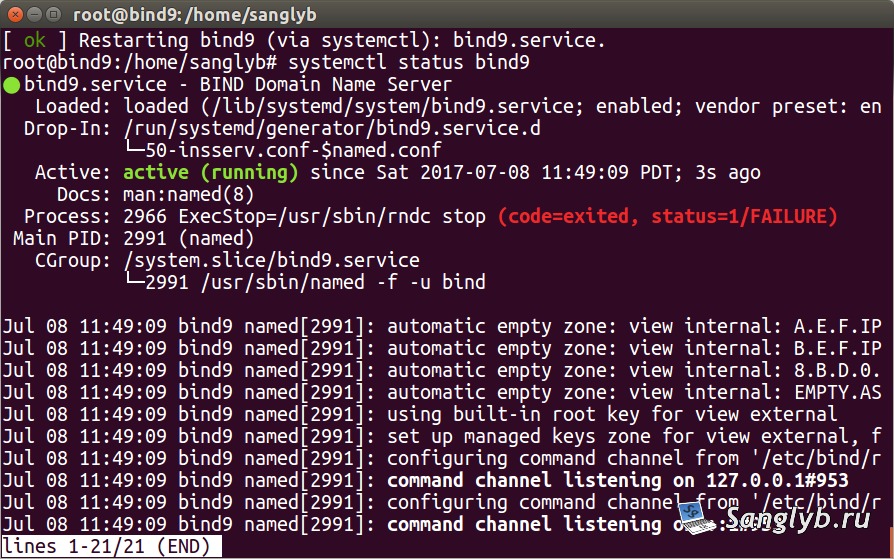
Takeaways
When using Bind9 for DNS redirection with multiple subnets, ACL offers a dynamic solution. Note that when a client uses third-party DNS servers, queries will route through them. Be cautious with recursive queries; leaving them open can expose your server to potential threats.