
Skip to content
www.mytechnote.ru
Menu
  • Administration
    • Scripts
  • Equipment
    • Reviews
    • Instructions
  • Other
  • English
    • English
    • Русский
Menu

Step-by-Step Guide to Updating GitLab from Repositories

Hello, dear readers! If you’ve encountered a problem when updating your GitLab server from repositories, this post is for you. Especially if you face an error related to the need to perform updates through intermediate versions, like this:

gitlab preinstall: It seems you are upgrading from 16.1 to 16.4.
gitlab preinstall: It is required to upgrade to the latest 16.3.x version first before proceeding.
gitlab preinstall: Please follow the upgrade documentation at https://docs.gitlab.com/ee/update/index.html#upgrade-paths

Such a situation means that you’ll need to install updates in a strict sequence.

In this guide, we’ll discuss how to do it correctly.

0. Backup your system.

1. Familiarize yourself with the recommended upgrade path using the link mentioned in the error message.

2. Find the current and all available package versions in the repository using the command:

apt list gitlab-ce -a
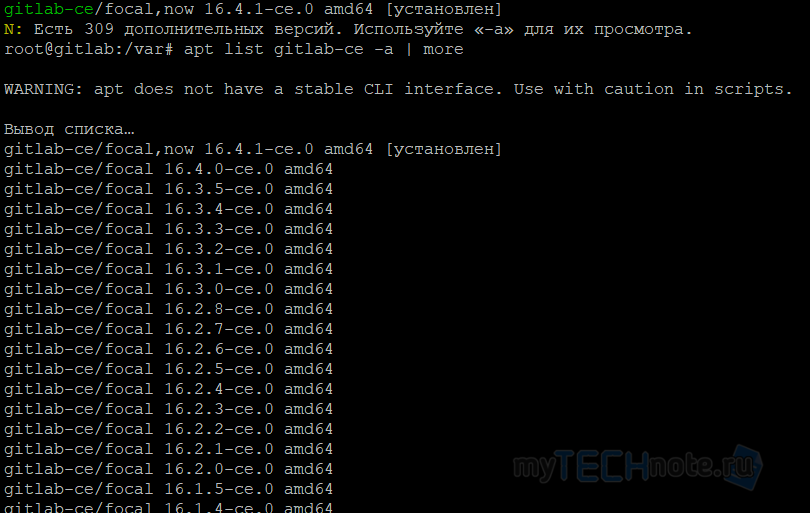
apt a list of gitlab-ce packages and their versions

In some cases, the following command might be useful:

apt-cache madison gitlab-ce

3. Install the required version using the command:

apt install gitlab-ce=16.1.0-ce.0

Replace it accordingly with the package version you need.

4. Repeat the update process until your system is up to date.
5. Once the process is finished, if your server has limited volume partitions, you can run the command

apt clean

to free up space occupied by cached gitlab-ce packages.
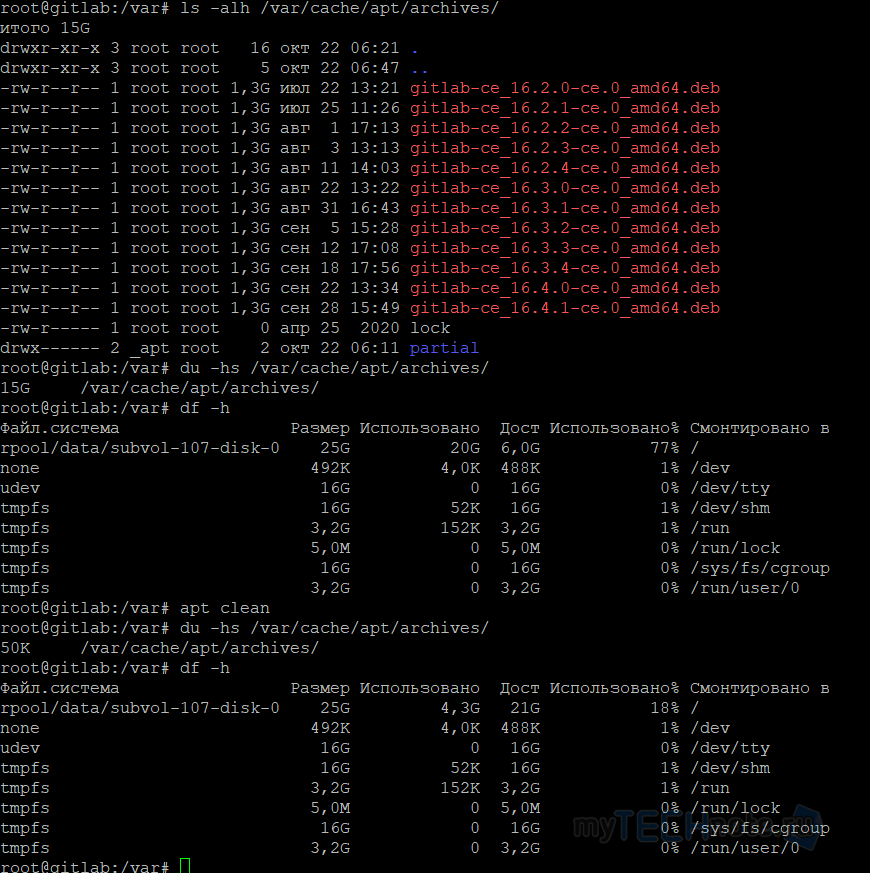
bash - view the volume occupied by apt cache, specifically gitlab-ce packages, and view free disk space

Posted on 22.10.202330.05.2024 by sanglyb

Post navigation

← Audit and Password Cracking in Active Directory: Steps and Tools
Automated password change of the account in the Windows Task Scheduler →

Leave a Reply Cancel reply

Your email address will not be published. Required fields are marked *

Подписывайтесь

Youtube
vk
telegram
github
twitter
rss
  • Форум
  • Об авторе
  • Поддержать автора

Популярные записи

Новые записи

  • How to Extend an LVM Partition in Linux
  • SCCM Reporting Errors After Migrating from SQL Server 2016 to 2019
  • Problem Using PassFiltEx on Older CPUs
  • How to remove attachments from old calendar events in Exchange using a script
  • How to download and install Office 2024 LTSC

Архивы

  • 2026 (3)
  • 2025 (5)
  • 2024 (7)
  • 2023 (30)
  • 2022 (4)
  • 2020 (17)
  • 2017 (82)
  • 2016 (5)
© 2015-2026 www.mytechnote.ru
Использование материалов сайта возможно только с разрешения владельца или обязательна индексируемая, прямая, передающая вес ссылка на материал.