
Skip to content
www.mytechnote.ru
Menu
  • Administration
    • Scripts
  • Equipment
    • Reviews
    • Instructions
  • Other
  • English
    • English
    • Русский
Menu

How to access Linux filesystem from Windows. WinSCP.

Sometime there are situations when you need to access remote Linux filesystem from Windows based computer, but you cannot install samba or ftp. And make an access to filesystem root folder with samba or ftp as you know not a good idea because it is unsecure. For that case you can use a little utility called WinSCP.

You can downlad it from here.

The programm working with sftp, scp, ftp and webdav. I will show you how it works with SCP protocol.

All you need is access to remote system with SSH. Connect to your remote computer – enter address, port, change transfer protocol. If you wish tou can save the connection. In my case address is 127.0.0.1, because I connecting throgh SSH tunnel. About configuration of SSH tunnels you can read in that article.

After all needed parameters are set, click the button connect.

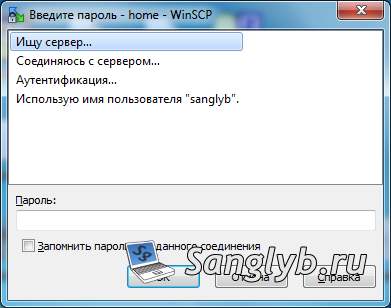
You need to enter your password (if you did not on the first window).
A new window should open, it have total commander, far or mc like look. On the left pane, there are local computer resources. On the right – remote.

To copy something you should select a file and click F5 button on your keyboard, to delete – press F8. Also you can edit files without need to download them.

I have a video about it (language is Russian):

Posted on 30.09.202030.05.2024 by sanglyb

Post navigation

← Not a standard way to change a wallpaper, and also how to prohibit users to change their wallpapers
Speed up a Ubuntu KVM host turn off process →

Leave a Reply Cancel reply

Your email address will not be published. Required fields are marked *

Подписывайтесь

Youtube
vk
telegram
github
twitter
rss
  • Форум
  • Об авторе
  • Поддержать автора

Популярные записи

Новые записи

  • How to Extend an LVM Partition in Linux
  • SCCM Reporting Errors After Migrating from SQL Server 2016 to 2019
  • Problem Using PassFiltEx on Older CPUs
  • How to remove attachments from old calendar events in Exchange using a script
  • How to download and install Office 2024 LTSC

Архивы

  • 2026 (3)
  • 2025 (5)
  • 2024 (7)
  • 2023 (30)
  • 2022 (4)
  • 2020 (17)
  • 2017 (82)
  • 2016 (5)
© 2015-2026 www.mytechnote.ru
Использование материалов сайта возможно только с разрешения владельца или обязательна индексируемая, прямая, передающая вес ссылка на материал.