
In this note, we’ll look at the command to check the password expiry date in Active Directory (AD).
PowerShell Command to Check Password Expiry Date
To find out the password expiry date, use the following PowerShell command:
(Get-ADUser -Identity username -Properties msDS-UserPasswordExpiryTimeComputed).'msDS-UserPasswordExpiryTimeComputed' | ForEach-Object -Process {[datetime]::FromFileTime($_)}Replace username with the desired user name.
Why net user Might Show Incorrect Date
Many are used to using the command:
net user username /domainHowever, note the difference in the results. net user can display outdated data. For example, if your domain uses Fine-Grained Password Policy (details can be found here), the results may differ. This is because net user does not always correctly account for the fine-grained password policies available in modern versions of Windows Server.
Example of Comparing Results
Here’s an example illustrating the difference in dates:
net usershows the password expiration date as: August 6- The PowerShell command shows the date as: July 7
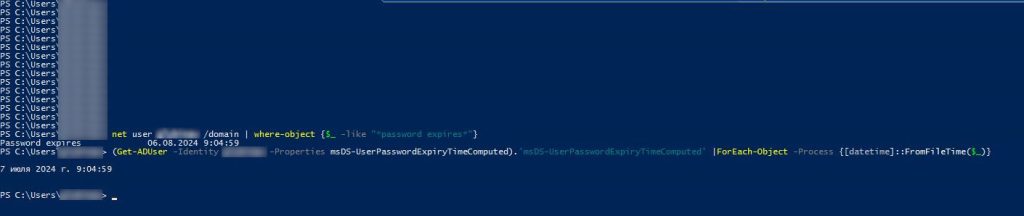
Use the PowerShell command to get the most accurate information about the password expiry date in AD.