
Skip to content
www.mytechnote.ru
Menu
  • Administration
    • Scripts
  • Equipment
    • Reviews
    • Instructions
  • Other
  • English
    • English
    • Русский
Menu

How to Check Password Expiry Date in Active Directory

In this note, we’ll look at the command to check the password expiry date in Active Directory (AD).

PowerShell Command to Check Password Expiry Date

To find out the password expiry date, use the following PowerShell command:

(Get-ADUser -Identity username -Properties msDS-UserPasswordExpiryTimeComputed).'msDS-UserPasswordExpiryTimeComputed' | ForEach-Object -Process {[datetime]::FromFileTime($_)}

Replace username with the desired user name.

Why net user Might Show Incorrect Date

Many are used to using the command:

net user username /domain

However, note the difference in the results. net user can display outdated data. For example, if your domain uses Fine-Grained Password Policy (details can be found here), the results may differ. This is because net user does not always correctly account for the fine-grained password policies available in modern versions of Windows Server.

Example of Comparing Results

Here’s an example illustrating the difference in dates:

  • net user shows the password expiration date as: August 6
  • The PowerShell command shows the date as: July 7
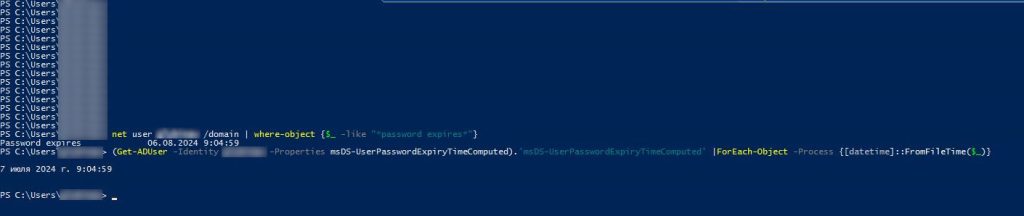
Example of Comparing Results

Use the PowerShell command to get the most accurate information about the password expiry date in AD.

Posted on 21.06.202421.06.2024 by sanglyb

Post navigation

← Automated password change of the account in the Windows Task Scheduler
Fixing the polkitd Error When Upgrading Debian from Version 10 to 12 →

Leave a Reply Cancel reply

Your email address will not be published. Required fields are marked *

Подписывайтесь

Youtube
vk
telegram
github
twitter
rss
  • Форум
  • Об авторе
  • Поддержать автора

Популярные записи

Новые записи

  • How to Extend an LVM Partition in Linux
  • SCCM Reporting Errors After Migrating from SQL Server 2016 to 2019
  • Problem Using PassFiltEx on Older CPUs
  • How to remove attachments from old calendar events in Exchange using a script
  • How to download and install Office 2024 LTSC

Архивы

  • 2026 (3)
  • 2025 (5)
  • 2024 (7)
  • 2023 (30)
  • 2022 (4)
  • 2020 (17)
  • 2017 (82)
  • 2016 (5)
© 2015-2026 www.mytechnote.ru
Использование материалов сайта возможно только с разрешения владельца или обязательна индексируемая, прямая, передающая вес ссылка на материал.