
Encountering email deletion errors following Exchange or WebSitePanel updates? This comprehensive guide will assist you in swiftly resolving the issue.
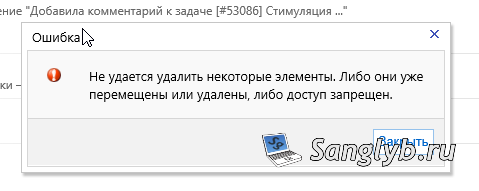
Identifying Problematic Mailboxes:
Recent updates have triggered a crucial parameter shift – “UseDatabaseQuotaDefaults” is now set to “false,” inadvertently setting “RecoverableItemsQuota” and “RecoverableItemsWarningQuota” to 0 bytes. This triggers the frustrating deletion error.
To locate mailboxes with these issues, follow these precise steps:
1. PowerShell Identification:
Get-Mailbox $domain | where {$_.RecoverableItemsQuota -eq '0 B (0 bytes)'} | fl *userprincipal*This command efficiently generates a list of mailboxes requiring attention.
2. Adjusting Quotas:
To swiftly resolve the issue, you must modify these quota values. Execute the following PowerShell command:
Set-Mailbox address@domain.ru -RecoverableItemsQuota unlimited -RecoverableItemsWarningQuota unlimited3. Streamlined Batch Update (Optional):
For those managing numerous mailboxes, an automated script simplifies the process:
$items=Get-Mailbox | where {$_.RecoverableItemsQuota -eq '0 B (0 bytes)'}
for ($k=0; $k -lt $items.Length; $k++) {
    Set-Mailbox $items[$k].UserPrincipalName -RecoverableItemsQuota unlimited -RecoverableItemsWarningQuota unlimited
    }
This script expedites quota adjustments for multiple mailboxes.
By following these precise steps, you can efficiently resolve email deletion errors arising after Exchange and WebSitePanel updates. Ensure your mailbox quotas are appropriately configured to prevent future issues.