
Skip to content
www.mytechnote.ru
Menu
  • Administration
    • Scripts
  • Equipment
    • Reviews
    • Instructions
  • Other
  • English
    • English
    • Русский
Menu

How to Enable Automatic Login on a Domain Computer: A Step-by-Step Guide

In organizations that utilize computers for purposes such as video surveillance, monitoring, or kiosks, having an automatic login system in place can be highly convenient. I’ve previously discussed how to enable automatic login on a home computer, but the process differs for domain-connected machines. However, it’s important to note a security consideration: the user’s password will be stored in plain text in the Windows registry.

If security is not a major concern for your specific use case, here’s how you can set up automatic login on a domain-connected computer:

Editing the Registry:

  1. Launch the Windows Registry Editor (regedit).
  2. Navigate to the following registry key: HKEY_LOCAL_MACHINE\SOFTWARE\Microsoft\Windows NT\CurrentVersion\Winlogon
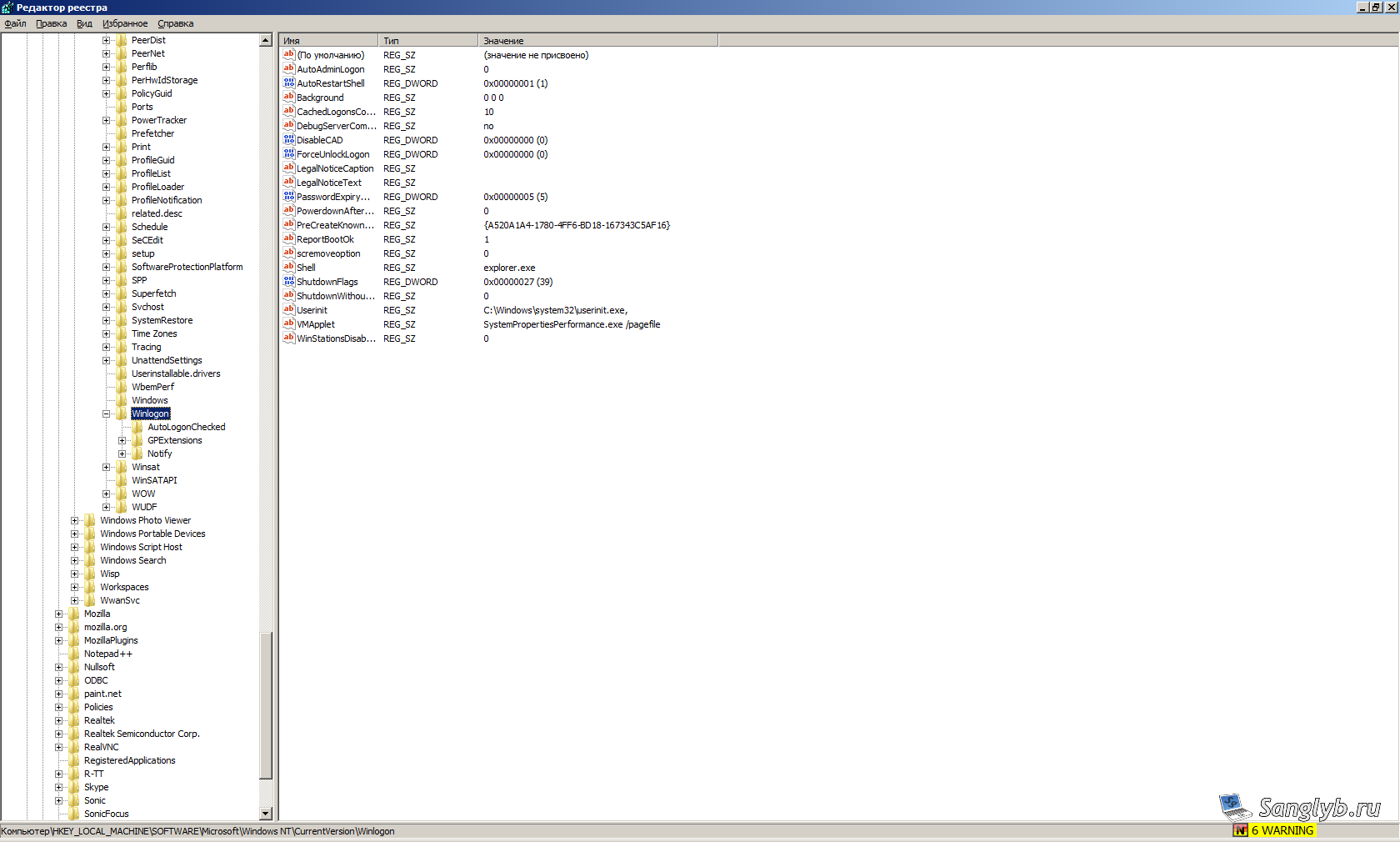
 

How to Enable Automatic Login on a Domain Computer: A Step-by-Step Guide

In this section of the registry, you’ll need to create or modify several string values:

  1. DefaultUserName: Set this to the username of the user who should automatically log in (without including the domain).
  2. DefaultPassword: Enter the user’s password as the value. Be cautious, as it will be stored in plain text.
  3. DefaultDomainName: Specify the domain name.
  4. AutoAdminLogon: Set this value to 1 to enable automatic login.
  5. If the parameter AutoLogonCount exists, delete it.

After making these registry changes, restart the computer. The user will now be able to log in without entering their password.

Video Tutorial:

Posted on 03.09.202330.05.2024 by sanglyb

Post navigation

← How to Add Certificate Chains for SSL Certificates pkcs12 (p12, pfx) Using OpenSSL, how to convert them
Mastering Game Streaming and Screen Recording on Ubuntu with OBS →

Leave a Reply Cancel reply

Your email address will not be published. Required fields are marked *

Подписывайтесь

Youtube
vk
telegram
github
twitter
rss
  • Форум
  • Об авторе
  • Поддержать автора

Популярные записи

Новые записи

  • How to Extend an LVM Partition in Linux
  • SCCM Reporting Errors After Migrating from SQL Server 2016 to 2019
  • Problem Using PassFiltEx on Older CPUs
  • How to remove attachments from old calendar events in Exchange using a script
  • How to download and install Office 2024 LTSC

Архивы

  • 2026 (3)
  • 2025 (5)
  • 2024 (7)
  • 2023 (30)
  • 2022 (4)
  • 2020 (17)
  • 2017 (82)
  • 2016 (5)
© 2015-2026 www.mytechnote.ru
Использование материалов сайта возможно только с разрешения владельца или обязательна индексируемая, прямая, передающая вес ссылка на материал.