
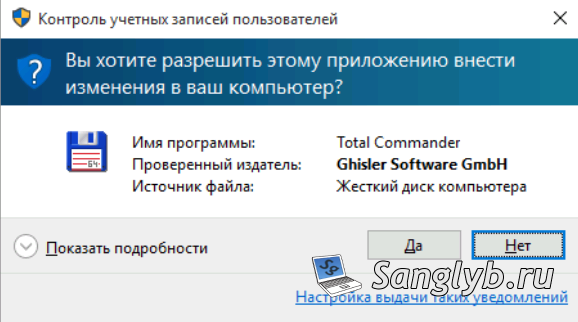
User Account Control (UAC) is when a computer needs administrator rights, it asks the user for permission, it looks something like this:
You can disable UAC in several ways:
1) From the control panel:
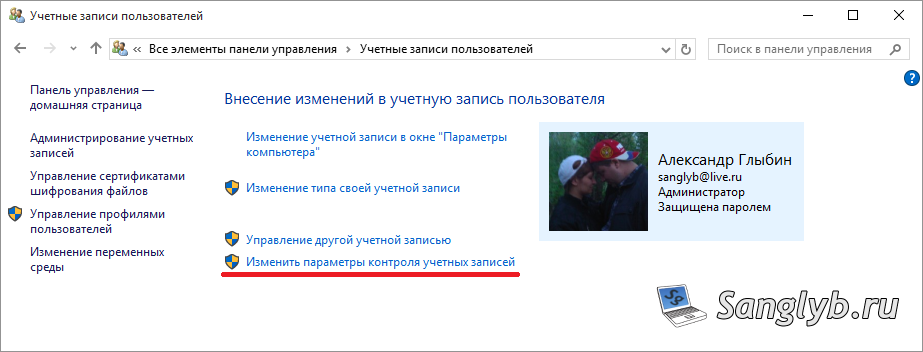
Go to the control panel, go to user accounts

In the window that opens, click – change the settings for User Account Control
Next, move the slider to the bottom and click OK
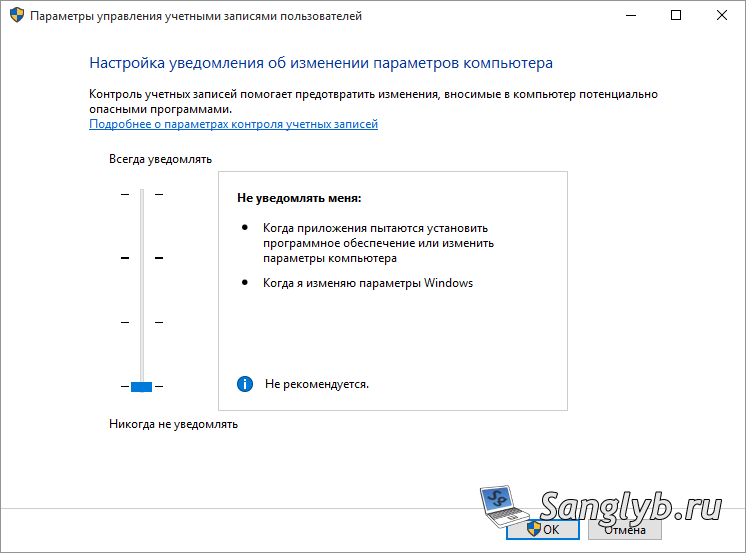
Restart the computer, User Account Control is disabled.
2) From the command line:
To disable it, enter the command:
C:\Windows\System32\cmd.exe /k %windir%\System32\reg.exe ADD HKLM\SOFTWARE\Microsoft\Windows\CurrentVersion\Policies\System /v EnableLUA /t REG_DWORD /d 0 /fTo enable:
C:\Windows\System32\cmd.exe /k %windir%\System32\reg.exe ADD HKLM\SOFTWARE\Microsoft\Windows\CurrentVersion\Policies\System /v EnableLUA /t REG_DWORD /d 1 /f
After entering the commands, you have to restart the computer.
3) Using Group Policy (only if you do not have a home version of Windows):
Run gpedit.msc, and go to Computer Configuration, Windows Settings, Security Settings, Local Policies, Security Settings.

Here you need to change the following parameters:
User Account Control: all administrators work in administrator approval mode – Enabled
User Account Control: Detecting application installation and requesting elevation of rights – Disabled
User Account Control: The Behavior of the Elevation Request for Administrators in Administrator Approval Mode – Enhancement of Rights Without Request
User Account Control: Administrator Approval Mode for Built-in Administrator Account – Disabled
After that, you need to type in the command line – gpupdate / force, UAC will be disabled.
Video on the topic (Russian language):