
In the ever-evolving realm of system administration, understanding how to manage and reset passwords is crucial. Today, we delve into FreeBSD 11, exploring its password reset mechanics, especially when juxtaposed against Linux systems.
Prerequisites:
Physical Access:
For any successful password reset, especially in systems like FreeBSD, having physical access to the device – be it a computer or server – is paramount.
Step-by-Step Process to Reset Password in FreeBSD 11:
System Reboot:
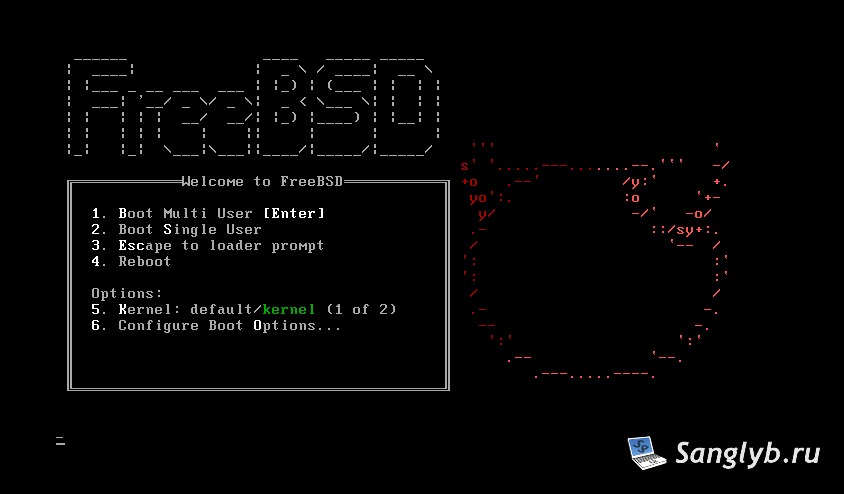
Begin by rebooting your FreeBSD system. As it starts, be on the lookout for the boot loading menu.
Entering Boot Single User Mode:
On spotting the boot menu, press the number corresponding to “Boot Single User”. Typically, this is ‘2’, but it might vary depending on your setup.
Input Commands:
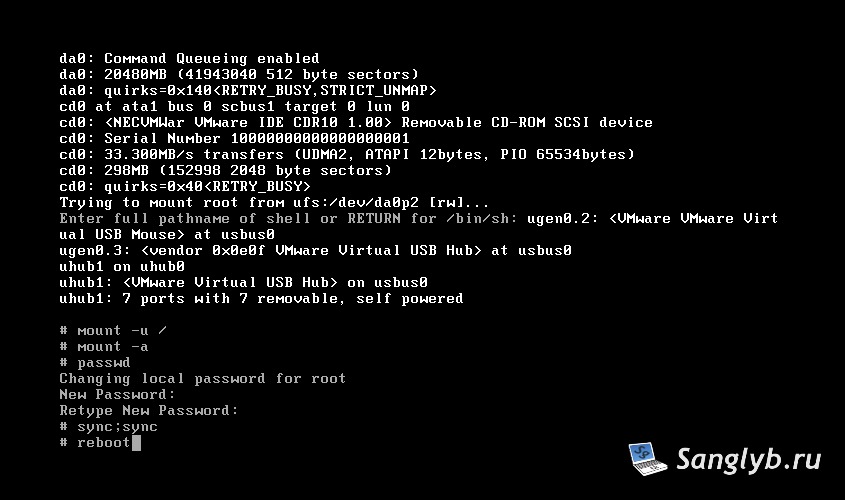
Once the system is up, it’s time to dive into the command line. Here’s a sequence to help you reset the password:
mount -u /
mount -a
passwd
After inputting these commands, you’ll be prompted to enter your new password twice for confirmation.
Finalizing the Reset:
Once the new password is set, ensure it’s saved and the system is ready to reboot with these commands:
sync;sync
reboot
Conclusion
Password resets, though straightforward, can be tricky. With this guide, resetting the root user password in FreeBSD 11 is simplified, ensuring you’re never locked out. As always, practice safe password management for optimal system security.
Related Reads: