
Skip to content
www.mytechnote.ru
Menu
  • Administration
    • Scripts
  • Equipment
    • Reviews
    • Instructions
  • Other
  • English
    • English
    • Русский
Menu

Save Your Progress: How to Keep Adobe Reader on Your Last Viewed Page

Tired of Adobe Reader always starting your PDFs on the first page? If you’re reading extensive documents, constantly hunting for where you left off can be a real productivity killer. In this blog post, we’ll unveil a simple trick to make Adobe Reader remember your last-read page, saving you valuable time and frustration.

Adobe Reader boasts a handy feature that enables you to seamlessly pick up where you left off in your PDFs. Here’s how to activate it:

  1. Launch Adobe Reader on your computer.
  2. Navigate to the “Edit” menu and select “Preferences.”
Save Your Progress: How to Keep Adobe Reader on Your Last Viewed Page

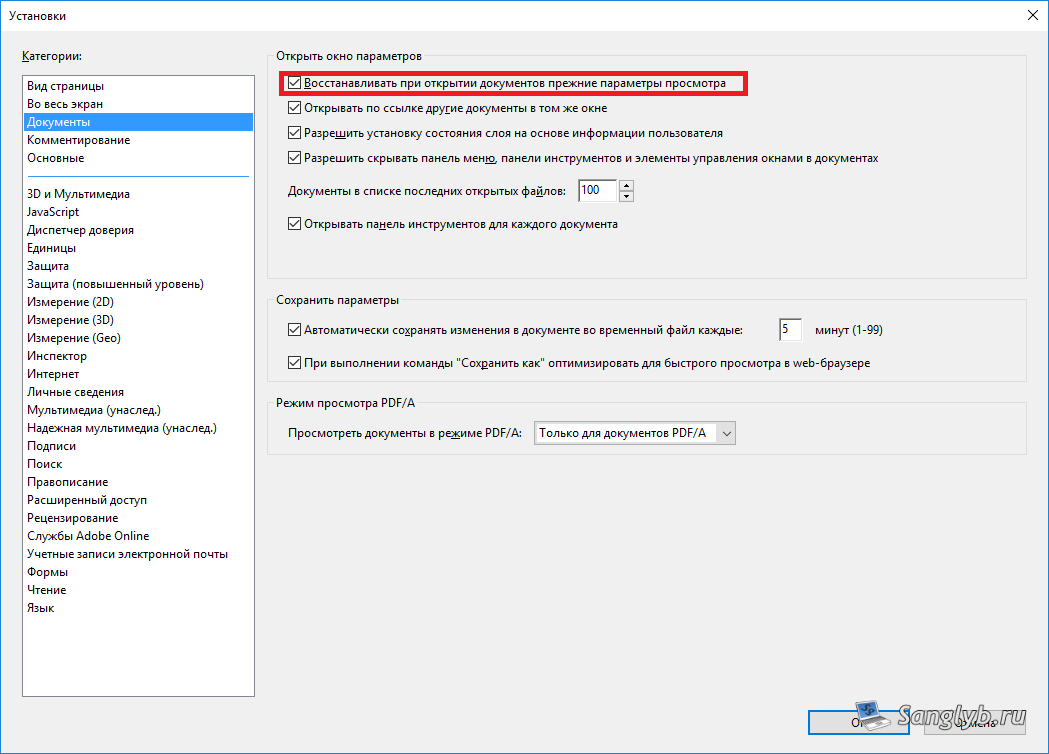
  1. Within the Preferences window, head to the “Documents” tab.
  2. Tick the checkbox next to “Restore last view settings when reopening documents.”
Save Your Progress: How to Keep Adobe Reader on Your Last Viewed Page

By following these four straightforward steps, Adobe Reader will automatically reopen your documents to the page you were last reading. Say goodbye to the annoyance of page-searching in extensive PDFs.

In summary, Adobe Reader provides an effective solution for those weary of commencing their PDFs from the beginning each time. Activating the “Restore last view settings” feature can significantly boost your reading efficiency and overall user experience.

Posted on 03.09.202330.05.2024 by sanglyb

Post navigation

← Efficient Computer Usage Tracking Program: Your Ultimate Guide
Optimizing Your Samsung Galaxy Tab 2: A Guide to Speed It Up with CyanogenMod →

Leave a Reply Cancel reply

Your email address will not be published. Required fields are marked *

Подписывайтесь

Youtube
vk
telegram
github
twitter
rss
  • Форум
  • Об авторе
  • Поддержать автора

Популярные записи

Новые записи

  • How to Extend an LVM Partition in Linux
  • SCCM Reporting Errors After Migrating from SQL Server 2016 to 2019
  • Problem Using PassFiltEx on Older CPUs
  • How to remove attachments from old calendar events in Exchange using a script
  • How to download and install Office 2024 LTSC

Архивы

  • 2026 (3)
  • 2025 (5)
  • 2024 (7)
  • 2023 (30)
  • 2022 (4)
  • 2020 (17)
  • 2017 (82)
  • 2016 (5)
© 2015-2026 www.mytechnote.ru
Использование материалов сайта возможно только с разрешения владельца или обязательна индексируемая, прямая, передающая вес ссылка на материал.